Wednesday, May 26, 2010

Slide Finder


powerPoint Slide Finder is a useful tool to quickly locate a specific slides. it is a simple matter to copy this slide to the current presentation, make slight edits if necessary, and your done.

Slide design

PowerPoint comes with a gallery of design templates to choose from, but you can also create a template of your own and add it to the slide design task pane. http://www.guidesandtutorials.com/image-files/ppt_designtemp2.gif

Presentations

There are several PowerPoint presentations available within the Guide to Grammar and Writing. These presentations make for rather hefty files and downloading may take some time over phone lines
.http://www.presentationzen.com/presentationzen/images/2007/04/09/ppt_wastebin_2.jpg

Placeholders

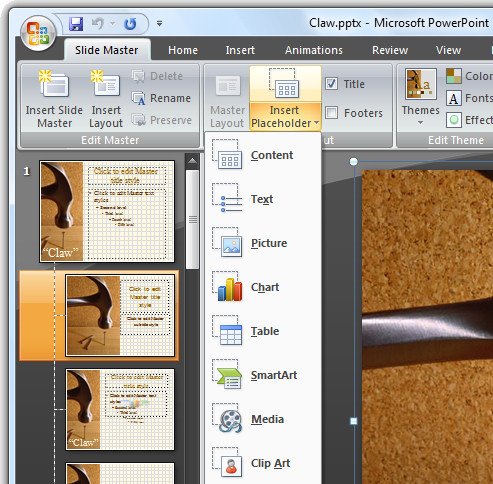
http://www.projectwoman.com/uploaded_images/powerpoint_placeholder-733166.jpg Placeholders are boxes with dotted borders that contain content and reside within a slide layout.

Normal view

normal View in Microsoft PowerPoint is the main working window in the presentation. This is more commonly known as Slide View
.http://www.recipester.org/images/c/c1/Change_Default_Font_in_PowerPoint09.png

Normal view

normal View in Microsoft PowerPoint is the main working window in the presentation. This is more commonly known as Slide View.
http://www.recipester.org/images/c/c1/Change_Default_Font_in_PowerPoint09.png

Exit effect


Exit effects are used to make an object or text leave the screen. Choose “Exit” from the “Add Effect” options list if you want to exit the screen is selected before making your exit choice.